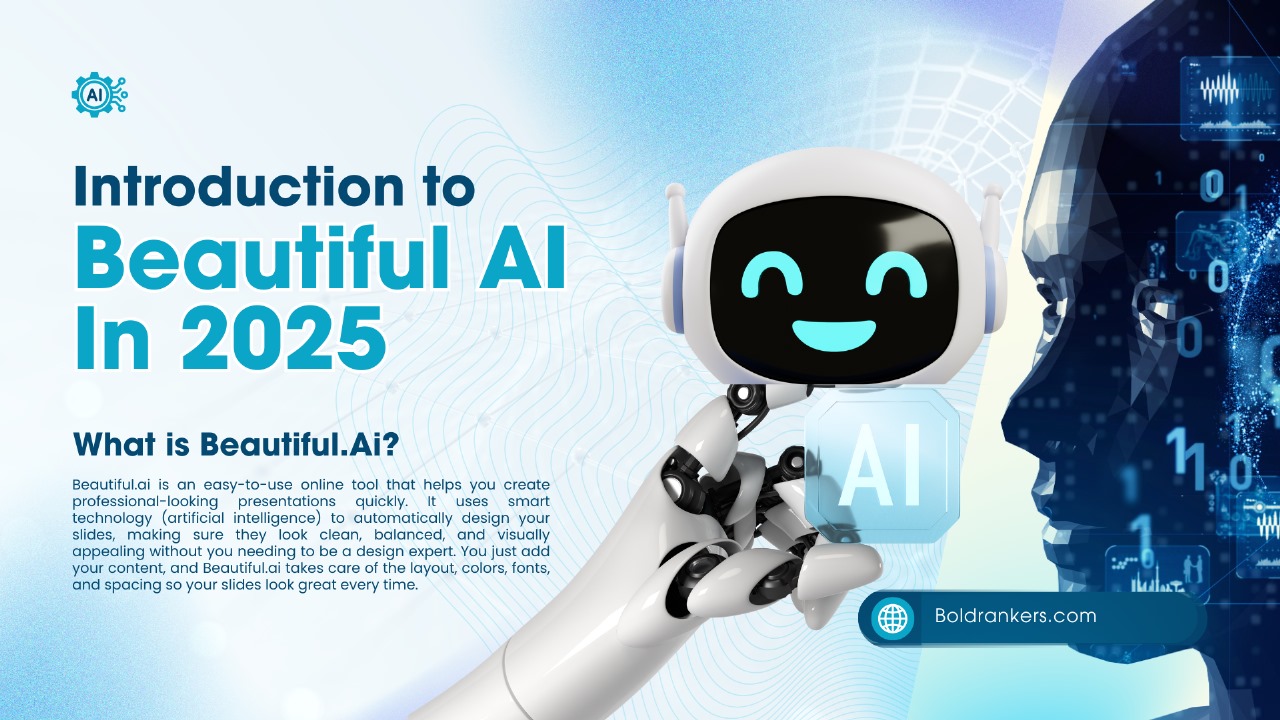
In today’s fast-paced business environment, AI-powered presentation software has revolutionized how professionals create impactful slides. These advanced AI tools use artificial intelligence to automate design, streamline workflows, and help users produce high-quality slides faster than ever before. Among the many options available, Beautiful.ai stands out as one of the leading AI-powered software platforms that combines ease of use with intelligent slide creation, allowing users to focus more on content and storytelling than on manual formatting.
By leveraging a sophisticated AI-powered design process, Beautiful.ai dynamically adjusts layouts, perfectly aligns elements, and suggests design improvements. This reduces common presentation pitfalls and elevates the overall quality without requiring deep design expertise, making it an ideal choice for both beginners and seasoned presenters.
Effortless Creation of High-Quality Slides
One of the biggest advantages of Beautiful.ai is its ability to generate high-quality slides effortlessly. Users no longer need to wrestle with complex design software or static slide templates that don’t quite fit their content. Instead, the AI ensures every slide looks polished and professional, automatically balancing text, images, and white space through presentation slide automation.
This effortless slide creation is crucial in 2025, where visual storytelling plays a vital role in communication. Whether creating sales decks, investor pitches, or training materials, the AI technology guarantees stunning results with minimal input, saving hours that would otherwise be spent tweaking slide details manually.
Comprehensive Pre-Set Templates and Smart Templates Adaptation
Beautiful.ai offers a comprehensive collection of pre-set templates designed to fit a wide range of business needs. These templates serve as foundational frameworks that users can quickly customize, ensuring brand consistency and design integrity across presentations.
These professional templates include effective layouts for data visualization, team introductions, timelines, and more. Thanks to smart templates adapt content features, these templates dynamically adjust layout, font sizes, and image placement in real-time as you add or remove content. This intelligent adaptation ensures slides maintain a clean, professional look that enhances audience comprehension and engagement.
Limitations in Stock Images and Template Library
While Beautiful.ai provides access to stock images, the platform’s limited range stock images library is somewhat narrower compared to competitors, which might restrict users seeking extensive image variety within the platform itself.
However, users can easily supplement this by uploading their own images or integrating with external libraries, ensuring presentations maintain visual diversity and relevance. Despite the limited template library and professional templates limited options, the AI’s ability to seamlessly integrate images and icons helps offset these limitations.
Balancing AI Automation and Manual Customization Templates
One of Beautiful.ai’s key strengths is its balance between AI automation and manual customization templates. While the software handles most design elements automatically, users still retain control over colors, fonts, and specific content placement.
This manual customization is essential for users who require corporate brand compliance or want to add a personal touch beyond what AI can predict. However, the available customization options are somewhat restricted compared to traditional design tools, highlighting Beautiful.ai’s philosophy of simplicity over granular control.
Revolutionary Text-to-Presentation Conversion
A standout feature of this AI presentation software is its text to presentation conversion capability. Users can input text such as reports or summaries, and the AI transforms it into visually engaging slides.
This functionality saves significant time and eliminates the need to start presentations from scratch. The AI identifies key points, generates relevant slide layouts, and organizes content logically, making the presentation creation process intuitive and efficient.
AI-Generated Presentations and the DesignerBot AI Tool
A hallmark feature of Beautiful.ai is its AI-generated presentations. By simply providing a topic or prompt, users receive an automatically crafted presentation deck with slides tailored to the subject matter.
Central to this capability is the DesignerBot AI tool, an innovative assistant that builds presentation slides automatically from user inputs. By interpreting prompts or outlines, DesignerBot selects appropriate slide types, layouts, and visual elements, acting as a virtual design assistant that accelerates workflow and improves presentation quality.
Vast Libraries of Images and Icons
To complement its slide templates and AI features, Beautiful.ai supports vast libraries of images and icons. These assets help users enhance presentations visually, making complex data and concepts easier to grasp.
The icon sets cover a wide array of categories—from business and technology to education—ensuring relevant visuals for different contexts. Integration of these elements is seamless, allowing quick insertion without disrupting the design flow.
AI-Powered Customizable Templates
What truly sets Beautiful.ai apart is its AI-powered customizable templates. Unlike static templates, these dynamically adapt as users input content, automatically adjusting layouts, font sizes, and element spacing.
This smart adaptability ensures presentations always look balanced and professional, regardless of the amount of text or imagery added. It removes the frustration of manual adjustments and provides a flexible yet consistent presentation experience.
Brand-Sync Corporate Brand Features for Brand Consistency
Brand consistency is crucial for companies, and Beautiful.ai supports brand-sync corporate brand functionality. Users can upload brand assets such as logos, color palettes, and fonts, which the AI then enforces across all slides automatically.
This ensures presentations not only look professional but also adhere to company identity, reinforcing brand recognition and trust. The corporate brand theme integration boosts professionalism and helps audiences easily recognize the organization.
Challenges: Limited Template Library and Low-Quality PowerPoint Export
While Beautiful.ai offers many smart templates, the overall limited template library can be a drawback for users needing a broader variety of themes or highly creative designs.
Another notable downside is the low-quality PowerPoint export. Exported files often suffer from missing fonts, overlapping layouts, and inconsistent formatting, causing issues when sharing with stakeholders who prefer offline editing or review. The platform is actively working to improve this, aiming to deliver high-fidelity PowerPoint files that preserve the original slide design perfectly.
Advanced Features and Animations
Beautiful.ai incorporates advanced features, animations, and slide transitions that make presentations more engaging. These AI-driven animations help convey messages more effectively by highlighting key points and maintaining audience interest.
In 2025, dynamic presentations combining visuals and motion are essential for effective communication and beautiful.ai’s automation of these features reduces the complexity traditionally associated with adding animations manually.
AI-Powered Design Process and Formatting Process Different from Traditional Tools
At its core, Beautiful.ai’s strength lies in its AI-powered design process. This technology analyzes user content and applies design principles automatically to produce aesthetically pleasing slides.
The formatting process, different from traditional tools like PowerPoint or Google Slides, means users don’t manually position and format elements. Instead, the AI handles these tasks automatically. This new approach has a learning curve but ultimately saves time and produces more professional-looking results without deep design knowledge.
Slide Library Feature and Pre-Designed Slide Templates
The platform includes a slide library feature offering a selection of pre-designed slides users can insert into presentations. This library accelerates presentation slide creation by providing ready-made layouts for common content types such as charts, timelines, and team profiles.
Users can browse and select slides that fit their narrative, combining them seamlessly with AI-generated content for a custom presentation. The pre-designed slide templates cover various presentation goals like data visualization and process flows, enabling consistent and visually effective decks.
Brief Overview of Other Notable AI Tools
In the expanding landscape of AI-driven productivity and content creation, several other tools have gained prominence alongside Beautiful.ai:
-
Jasper AI is a versatile AI writing assistant known for generating high-quality, human-like text for blogs, marketing copy, and social media content. It helps users overcome writer’s block and scale content production efficiently.
-
Originality AI specializes in content authenticity verification. It’s widely used to detect AI-generated text and plagiarism, ensuring that written material maintains originality and meets ethical content standards—important for SEO and academic integrity.
-
Surfer SEO combines AI with data-driven SEO strategies to optimize website content for search engines. It provides real-time keyword suggestions, content grading, and competitor analysis, helping businesses improve organic rankings and visibility.
-
Lexica Art is an AI-powered tool that generates stunning, high-resolution images and artwork, often used for creative projects, marketing visuals, and website graphics. It complements platforms like Beautiful.ai by enhancing visual content options.
-
Zapier is a popular AI-driven automation platform that connects different apps and services, enabling workflows without manual intervention. It’s valuable for automating repetitive tasks, integrating tools like Beautiful.ai with email, project management, or CRM software.
-
Undetectable AI refers to sophisticated AI content generation techniques designed to produce text that passes AI detection tools and appears fully human-written. This is increasingly important as AI content creation becomes mainstream and detection technologies advance.
Together, these tools represent the diverse capabilities of AI in transforming how we create, optimize, and manage digital content and workflows. Whether it’s crafting presentations, writing articles, verifying originality, or automating tasks, AI technologies are reshaping productivity across industries
Creating Presentations from Scratch and Generating Presentations via Prompts
Users can create new presentations by selecting a template or start from scratch, leveraging Beautiful.ai’s smart tools for layout and design.
For those who want full control, they can also build a presentation from scratch, with AI assistance making the design process easier. Furthermore, users can generate presentation prompts by providing detailed outlines or detailed outline prompts, which the AI interprets to structure the presentation logically and compellingly.
Stunningly Choreographed Narrative and Storytelling-Oriented Presentation
Beautiful.ai helps users craft stunningly choreographed narratives by combining smart slide sequencing, animations, and cohesive visual design.
This platform emphasizes story-telling-oriented presentation, guiding users to create narratives rather than just a collection of slides. This focus aligns with modern communication trends prioritizing engagement and message retention through storytelling techniques.
Key Features
| Feature | Beautiful.ai vs. Common Alternatives |
|---|---|
| AI-powered design | Beautiful.ai: Yes / Common Alternatives: Yes |
| Pre-set templates | Beautiful.ai: Limited but high quality / Alternatives: Larger, more varied |
| Stock image library | Beautiful.ai: Limited / Alternatives: More extensive |
| Manual customization | Beautiful.ai: Moderate / Alternatives: Varies |
| Text-to-presentation conversion | Beautiful.ai: Yes / Alternatives: Yes |
| Brand-sync capabilities | Beautiful.ai: Strong / Alternatives: Varies |
| PowerPoint export quality | Beautiful.ai: Needs improvement / Alternatives: Often better |
| Free trial | Beautiful.ai: 14 days, credit card required / Alternatives: Some offer free tiers without cards |
| Pricing | Beautiful.ai: Higher price point / Alternatives: Competitive pricing |
| Animation features | Beautiful.ai: Advanced / Alternatives: Comparable |
| Collaboration tools | Beautiful.ai: Basic / Alternatives: More advanced |
Additional Use Cases of beautiful.ai: Polished Presentations, Documents, Websites, Social Media Ads, and Banners
Beyond presentations, some AI tools can create polished presentation documents and websites, and extend into marketing materials like social media ad banners.
While Beautiful.ai specializes in presentations, integration with complementary tools can broaden users’ content creation capabilities, supporting a full spectrum of document types and marketing collateral.
Pricing Plan of Beautiful.AI
Monthly Price Plan
| Plan | Monthly Price & Details |
|---|---|
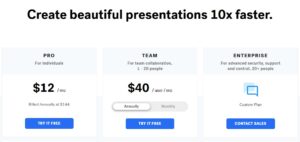
| Pro | $12 per month (Billed annually at $144) – For individuals |
| Team | $50 per user per month – For team collaboration (1–20 people) |
| Enterprise | Custom pricing – For advanced security, support, and control (20+ people) – Contact sales |

Annual Price Plan
| Plan | Annual Price & Details |
|---|---|
| Pro | $12 per month (Billed annually at $144) – For individuals |
| Team | $40 per user per month (Billed annually) – For team collaboration (1–20 people) |
| Enterprise | Custom pricing – For advanced security, support, and control (20+ people) – Contact sales |
Collaboration and Customer Support
Beautiful.ai provides collaboration features support, allowing teams to work on presentations together efficiently. Their customer service includes support policies to assist users with any issues, although some users report room for improvement in response times and resource availability.
Alternative AI Presentation Tools
Though Beautiful.ai is a leader, alternative AI presentation tools like Presentations. AI, Canva, and Gamma offer different features, pricing, and user experiences. Exploring alternative tools can help users find the best fit for their specific needs and budgets.
Presentations.AI, for example, provides a free tier without requiring credit cards, whereas Canva offers a broader template library, limitations, and multi-purpose design capabilities.
Conclusion
In conclusion, Beautiful.ai continues to stand out as a robust and innovative AI presentation software choice in 2025, particularly for users who value automated design, seamless brand consistency, and overall ease of use. Its intelligent, AI-powered design process allows users—whether they are business professionals, educators, or marketers—to produce visually stunning, professionally formatted slides with minimal effort. The platform’s focus on smart templates that adapt content dynamically and the integration of the powerful DesignerBot AI tool helps streamline the often time-consuming presentation slide creation process, saving valuable time while maintaining a high standard of design quality.
However, like any software, Beautiful.ai has its limitations. The limited template library may not fully satisfy users looking for a broad variety of creative or niche designs, and the low quality PowerPoint export remains a notable drawback, especially for those who need flawless offline editing or collaboration via Microsoft PowerPoint. Despite these issues, Beautiful.ai’s commitment to enhancing productivity through AI-driven features ensures that users can quickly craft polished, brand-aligned presentations without requiring advanced graphic design skills.
For professionals seeking to deliver high-impact, storytelling-oriented presentations that resonate deeply with their audiences, Beautiful.ai offers a compelling solution. It successfully blends cutting-edge technology and creative design principles to help users focus on narrative and engagement, rather than technical formatting details. As modern communication increasingly demands visually engaging and coherent stories, Beautiful.ai’s approach aligns perfectly with these evolving presentation needs, making it an invaluable tool in the digital age.
Frequently Asked Questions About Beautiful.ai and AI Presentation Tools
Can we use Beautiful.ai for free?
Yes, Beautiful.ai offers a free tier that allows users to create presentations without payment, providing access to essential features to explore the platform. This free trial tier typically lasts 14 days and requires credit card information, after which it automatically converts to a paid plan unless canceled. While the free version is useful for basic presentation slide creation, some advanced features and templates are reserved for paid subscription plans.
Is Beautiful.ai better than PowerPoint?
Beautiful.ai and PowerPoint serve different needs. Beautiful.ai excels in its AI-powered design process and smart templates that adapt content automatically, making it ideal for users who want high-quality slides effortlessly without deep design skills. However, PowerPoint offers more granular control and a broader range of manual customization templates. One limitation of Beautiful.ai is its low-quality PowerPoint export, which can affect offline editing. Overall, Beautiful.ai is better for fast, polished, and brand-consistent presentations, while PowerPoint is preferred for full customizability.
Is Beautiful.ai free for teachers?
Currently, Beautiful.ai does not offer a specific free plan or discounts exclusively for teachers. Teachers can use the free tier create presentations option during the trial period, but to access full features, they typically need to upgrade to a paid plan. For educators seeking budget-friendly options, exploring alternative AI presentation tools with education discounts might be beneficial.
Is Beautiful.ai easy to use?
Yes, Beautiful.ai is designed with user-friendliness in mind. Its AI-powered customizable templates and DesignerBot AI tool simplify the presentation creation process, guiding users through slide design and formatting automatically. The platform’s formatting process differs from traditional tools like PowerPoint, which might have a short learning curve, but overall, it helps users—regardless of design experience—create professional and visually appealing presentations quickly.
Does Beautiful.ai use ChatGPT?
Beautiful.ai does not explicitly use ChatGPT technology. Instead, it relies on proprietary AI algorithms focused on AI-powered design automation and slide layout optimization. However, many modern AI tools integrate language models like ChatGPT for content generation, so Beautiful.ai may expand its AI capabilities in the future or integrate similar AI features for enhanced text-based slide creation.
Is AI good for girls?
Yes, AI is good for everyone, including girls and women, as it offers powerful tools that enhance creativity, productivity, and learning opportunities. AI-driven platforms like Beautiful.ai empower users regardless of gender by simplifying complex tasks such as presentation slide creation and design. Encouraging girls to engage with AI technology promotes diversity, innovation, and equal opportunities in tech and creative industries.